- Added a Moonshot AI / Kimi connector with local key storage, configurable API endpoint, and availability checks.
- The catalog now includes current Kimi K3, K2.7 Code, K2.6, K2.5, and Moonshot V1 models; scanning filters models unavailable to a specific account.
- Added official Moonshot input, cached-input, and output token prices for History, Pricing, and Analytics.
- Moonshot models can be selected as experts, moderator, judge, and Evaluation participants.
Windows app · model comparison · PDF/CSV reports
AI Orchestra — a Windows app for comparing AI models with your API keys
Connect providers, run one prompt across several models, and compare answers, cost, speed, and quality.
- Connect OpenAI, xAI, Mistral, and other providers.
- Run the same prompt across several models.
- Compare answers, cost, speed, and quality.
- Save the result as PDF/CSV.
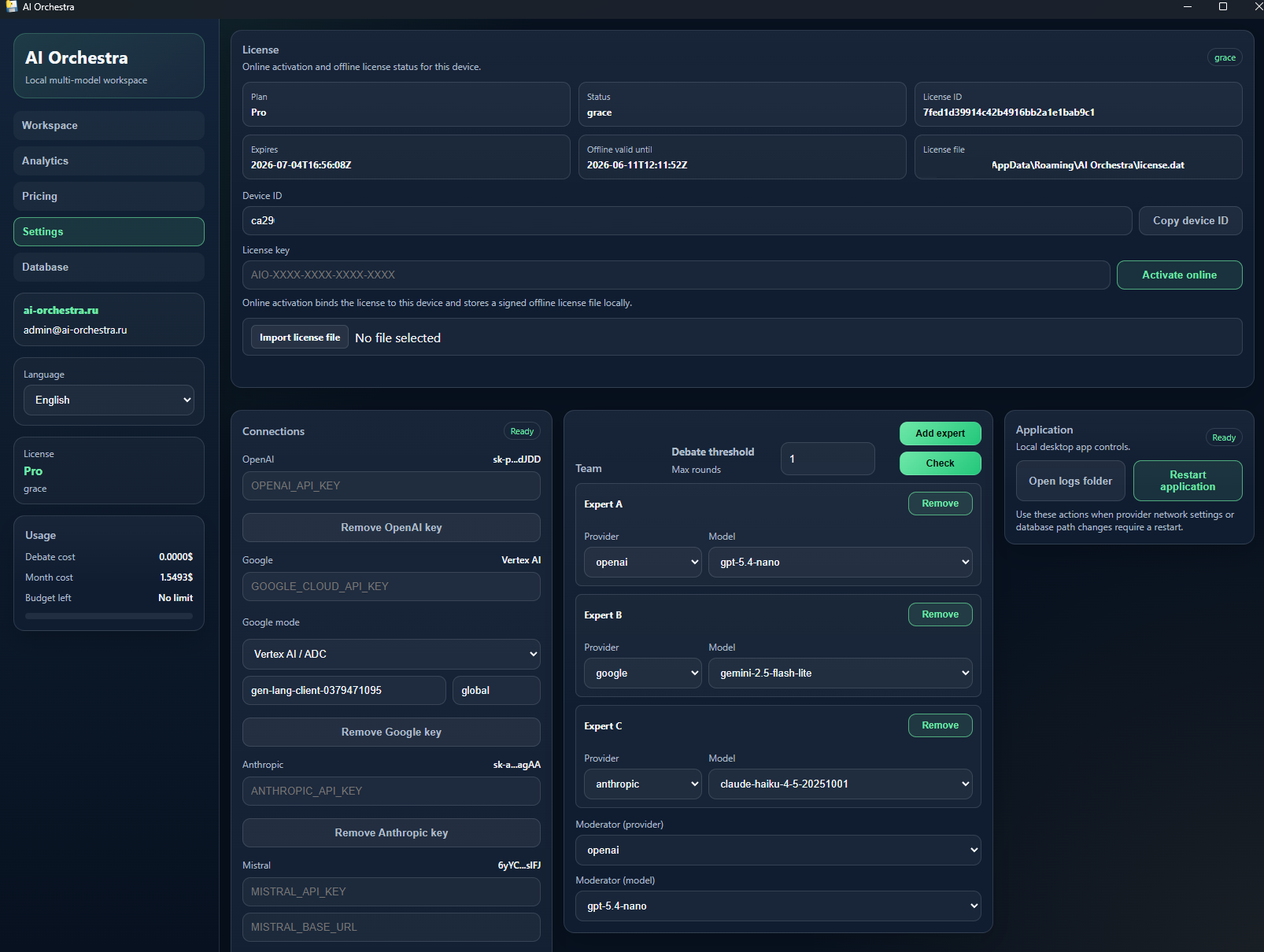
App settings section
This shows the Settings section: license, API providers, model selection, moderator, costs, and app controls in one window.
Google supports two modes: regular Gemini API key or Vertex AI / ADC. In Vertex AI mode, the app uses a preconfigured Google Cloud environment: ADC, service account, project, and location. A regular API key is not required in this mode.
30 seconds
What the app does
- Paste your API keys.
- Select 2–5 models.
- Enter one prompt or a test set.
- AI Orchestra runs the prompt through the models.
- You see cost, speed, scores, and a report.
API key safety
API keys stay with you
- AI Orchestra is installed locally on Windows.
- The app interface runs locally on 127.0.0.1.
- Your API keys are used on your computer.
- We do not proxy your requests through our server.
- You pay providers directly through your own API keys.
- The Pro license unlocks analytics, reports, and advanced app features.
Update
Version 0.1.4
July 19, 2026
- Added full Moonshot AI / Kimi support: API key setup, connection checks, and available-model scanning.
- Kimi models are available in the orchestrator, moderator role, and built-in Evaluations alongside other providers.
- Official Moonshot rates are used for token accounting, run costs, and efficiency analytics.
- Installer 0.1.4 installs over previous versions and preserves local settings, history, and license data.
Changelog
Version history
- Fixed in-app restart: the new process starts without cmd.exe, a visible console, or the Windows missing-file error.
- The app releases the single-instance lock before launching the new copy, so restart does not conflict with duplicate-window protection.
- The app launches as a regular Windows window via pywebview: no visible Flask console and no external browser.
- Added support actions: open logs folder and restart application.
- Fixed bundled static files: KaTeX auto-render and favicon are served from the local package.
- Updated model catalog and hid deprecated models from new evaluation runs.
- Clarified website copy, pricing, and Free/Pro access descriptions.
- First public Windows installer for AI Orchestra with local app launch.
- Base workflows: API key setup, expert team, moderator, history, and cost analytics.
What it is
Orchestrator with analytics for major model providers connected by API keys
AI Orchestra helps compare models on built-in evaluation scenarios, see run costs, and understand where quality does not justify the price.
Reporting
Results you can audit
Each test stores scores, errors, notes, cost, and PDF/CSV reports so conclusions remain auditable.
License
Free for trying, Pro for systematic comparison
Free — to try it
- connect your own API keys;
- choose a provider and model;
- run basic prompts;
- configure existing experts;
- check whether the app fits your workflow.
Pro — for systematic model comparison
465 RUB / 30 days
- AI model quality tests;
- quality, cost, and speed comparison;
- PDF/CSV reports;
- run history;
- expert and round-count configuration;
- model selection by value: price / quality / speed.
How it works
A simple workflow without extra steps
- Install AI Orchestra on Windows.
- Connect your own provider API keys.
- Run prompts or quality tests on selected models.
- Compare quality, speed, cost, and reviewer-model notes.
- Export PDF/CSV reports for result auditing.
What the workflow looks like
Positioning
How AI Orchestra differs from other tools
| Tool | Main purpose |
|---|---|
| ChatGPT | Chat with one model in a ready-made interface |
| OpenRouter | Access different models through one API |
| LM Studio | Run local models on your computer |
| AI Orchestra | Compare API models by quality, cost, speed, and reports |
AI Orchestra does not replace ChatGPT, OpenRouter, or LM Studio. It is for understanding which model works best for your task and how much it costs.
What it can do
- AI model quality tests;
- orchestrating several models from different providers in one local workspace;
- compare answers, cost, speed, and value score;
- PDF/CSV reports with methodology and results;
- local task history and API cost control.
How to buy
- Download the Free version without registration or create an account to buy Pro.
- Choose the 30-day Pro license.
- Pay through Robokassa or through support if the checkout is temporarily unavailable.
- After payment, the Pro key and order status appear in your account.
- Use your own computer and your own API keys.
What the user gets
After buying Pro
- the Pro license key in your account;
- a 30-day Pro license;
- quality tests, task history, and cost analytics;
- installation and activation support.
Why it matters
The paid value is analytics
The orchestrator is useful on its own, but Pro is for systematic model evaluation: tests, reports, cost, quality, and auditable conclusions.